

An AI tool for business should solve the work behind the request, not just answer a question on the front of the website. A chatbot can be useful when customers need quick answers, but it is the wrong starting point when the real problem is intake, routing, quoting, approvals, scheduling, document review, or follow-up.
That is the mistake a lot of small teams make. They picture AI as a chat window because that is the easiest thing to imagine. Then the tool sits on the site, answers a few basic questions, and leaves the actual work untouched. The phone still rings. The inbox still fills up. Someone still copies details from a form into a spreadsheet, calendar, CRM, or job folder.
An AI tool for business has to match the job
An AI tool for business should be chosen by the job it needs to perform, not by the interface people see first. Chat is only one interface. It is not the whole system.
If the job is answering common public questions, a chatbot might be enough. If the job is reviewing a request, checking missing details, pulling context from a record, drafting a response, routing work to the right person, or preparing the next task, the business probably needs an internal AI workflow instead.
That is an important distinction for Quad Cities businesses that run on practical operations: service calls, job requests, RFQs, appointments, client files, approvals, parts, reports, and follow-ups. The useful AI is often not the thing that talks the most. It is the thing that quietly reduces the manual handling between request and action.
A chatbot is useful when the problem is conversation
A chatbot is a good fit when the work is mostly answering repeatable questions and guiding people to the right next step. It can help with hours, service descriptions, basic triage, appointment links, directions, document requirements, and common pre-sale questions.
A chatbot is weaker when it has to make operational decisions without reliable context. If a customer asks, “Can you fit me in Tuesday?” the answer depends on a calendar, staffing, location, duration, parts, priority, and maybe an existing customer record. If the bot cannot safely check those systems or hand the request to a controlled workflow, it becomes a polite guessing machine.
The question is not “Can AI answer this?” The better question is “What happens after the answer?” If the answer still creates a manual task for someone else, the business may need a workflow system instead of a public-facing chat layer.
An internal AI workflow is useful when the problem is handoff
An internal AI workflow is a better fit when the hard part is turning messy input into a clean next action. That might mean summarizing requests, extracting details from forms, comparing an incoming job to a checklist, drafting a reply, flagging exceptions, or assigning a request to the right queue.
For example, a service business might not need a chatbot at all. It may need a tool that reads an intake form, checks whether the request has enough information, drafts a follow-up question, routes urgent jobs differently from routine work, and logs the activity where the team already works.
That is where QC Devworks tends to think in terms of workflow systems, internal tools, and AI agents and automation. The visible interface can be simple. The value is in the controlled handoff.
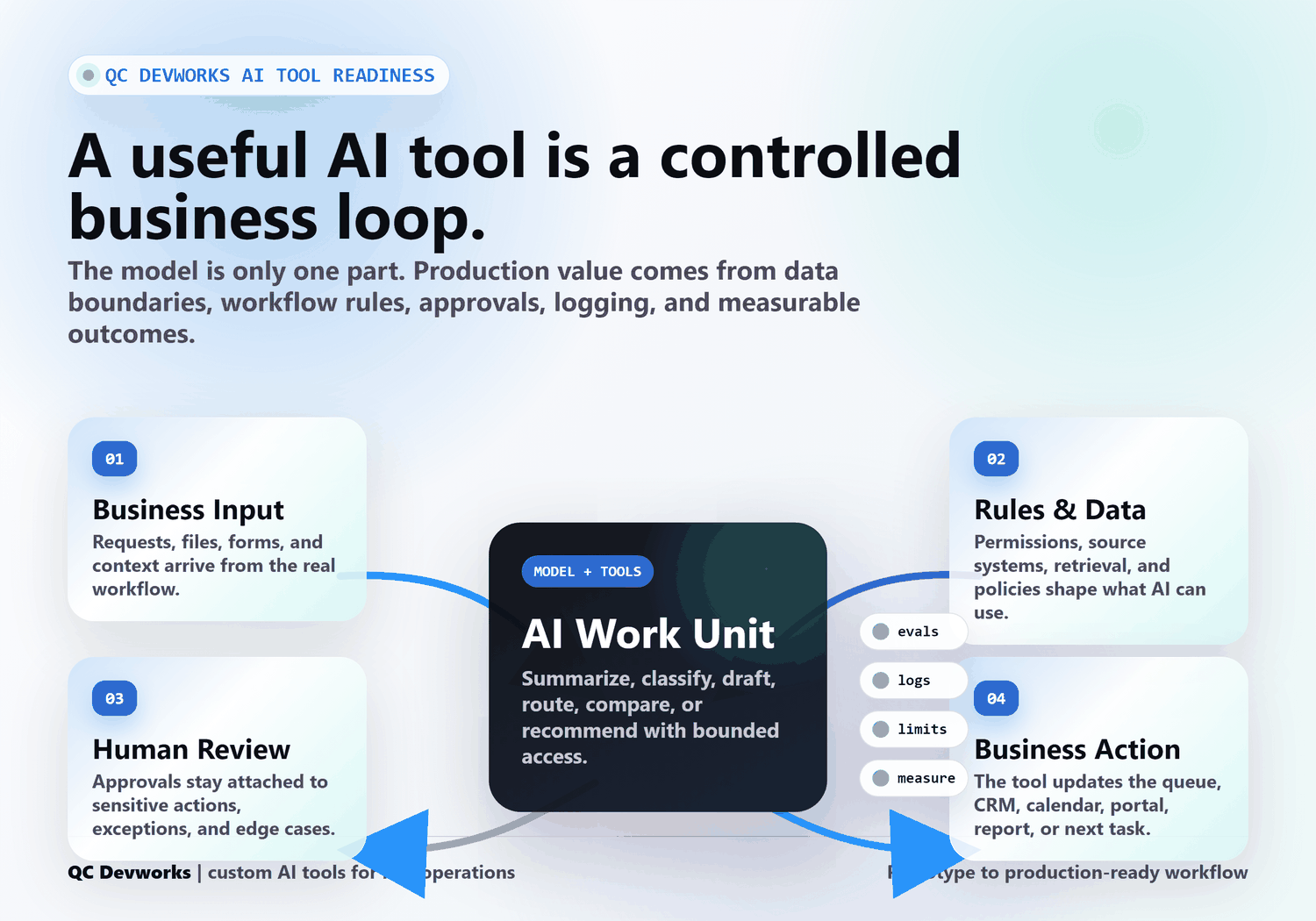
A production-ready AI tool needs controls around the model
A production-ready AI tool needs boundaries, logging, testing, review, and failure handling around the model. The model is only one part of the system.
As of June 2026, NIST describes the AI Risk Management Framework as voluntary guidance for improving how organizations incorporate trustworthiness into AI products, services, and systems. That matters because a business AI tool is not just a clever prompt. It touches real customers, staff time, records, decisions, and sometimes sensitive information.
The controls do not have to be heavy for every small business tool, but they should be intentional. A practical production setup usually defines:
- What data the tool can access.
- What data it must never expose.
- Which actions require human approval.
- How outputs are checked before they affect a customer or record.
- Where logs, errors, and exceptions are reviewed.
- How the team knows whether the tool is saving time or creating cleanup work.
OWASP’s guidance for large language model applications lists risks such as prompt injection, sensitive information disclosure, excessive agency, and overreliance. Those are not abstract security words. In a small business workflow, they translate into very normal questions: Can the tool be tricked? Can it reveal something it should not? Can it take an action without permission? Will staff trust it too much?
The manual process vs. better system pivot
The fastest way to find the right AI tool is to map the manual process first. If the current workflow is unclear, AI will usually make the confusion faster, not better.
Take a common intake process. The manual version looks like this: a form arrives, someone reads it, asks for missing information, checks a calendar, copies the request into a spreadsheet, messages a manager, waits for approval, replies to the customer, and tries to remember to follow up. A chatbot at the front of that process may answer a few questions, but the handoff is still messy.
A better system looks different. The form captures the right fields. The AI summarizes the request. Rules check priority, location, service type, and missing details. A human approves exceptions. The system drafts the reply, updates the record, creates the task, and leaves a trail. That is not just chat. That is an operational tool.
This is why the build process matters. The useful work is often in shaping the workflow before choosing the AI layer.
How to choose between chatbot, automation, internal AI tool, and agent
The right AI tool depends on how much context, judgment, and action the workflow needs. Use the smallest tool that can safely do the job.
| Use case | Better fit | Why |
|---|---|---|
| Answering basic public questions | Chatbot | The work is conversational and low-risk. |
| Moving form details into the right place | Automation | The rules are mostly predictable. |
| Summarizing, classifying, drafting, or checking requests | Internal AI tool | The work needs judgment but can stay bounded. |
| Planning multiple steps across tools | AI agent | The work needs tool access, memory, review, and tighter controls. |
Most small businesses should not jump straight from no system to a fully autonomous agent. Start with the workflow. Add AI where it removes a real bottleneck. Keep approvals around risky actions. Then measure what changed.
A useful AI tool should leave evidence
A useful AI tool should leave evidence that it is working: cleaner queues, faster handoffs, fewer missing details, better drafts, clearer exceptions, and less duplicate entry. If it cannot be measured, it will be hard to improve.
OpenAI’s evals guidance is aimed at developers testing model behavior, but the business lesson is simple: define what good output looks like and test against it. A team can start small with sample requests, expected classifications, draft quality checks, and a list of failure cases. The point is not perfection. The point is to avoid deploying a tool that only looks impressive in a demo.
Good measurements for an internal AI tool might include:
- How many requests were routed correctly.
- How often staff had to rewrite the AI draft.
- How many missing-detail follow-ups were avoided.
- How long a request sat before the next action.
- Which exceptions still require human judgment.
That evidence is what separates a business tool from a novelty.
When QC Devworks would avoid a chatbot
QC Devworks would avoid a chatbot when the visible conversation is not the real bottleneck. If the team is buried in messy handoffs, duplicate entry, scattered files, unclear ownership, or slow approvals, a chat interface may only decorate the problem.
In those cases, the better first step is usually a small operational system: a sharper form, a routing workflow, a lightweight portal, an internal review screen, an AI-assisted draft step, or an integration between tools the business already uses. For manufacturers, that might connect to quote intake. For professional services, it might support client intake and document review. For a local service business, it might organize dispatch, follow-up, and scheduling handoffs.
The custom software development decision is not always “build a huge application.” Sometimes it is a focused internal tool that removes the worst manual step.
What to decide before building an AI tool
Before building an AI tool, decide what work it owns, what it can access, what it can change, and where a human stays in the loop. Those decisions are the difference between a useful system and a risky shortcut.
Use this quick filter:
- If the work is answering public questions, consider a chatbot.
- If the work is predictable movement between tools, consider automation.
- If the work needs summarizing, classification, drafting, or review, consider an internal AI tool.
- If the work needs multi-step planning across systems, consider an agent only after the controls are clear.
- If the process itself is messy, map it before adding AI.
That is a more useful starting point than asking whether your business “needs AI.” The better question is which work is expensive enough, repeatable enough, and bounded enough to deserve a system.
The right AI tool feels less like a demo and more like operations
The right AI tool feels less like a demo and more like a smoother day at work. It does not need to impress everyone in the room. It needs to reduce the next manual step.
For QC Devworks, that is the point: practical AI software for real workflows, not a chat widget stapled onto the front of the site. If the problem is customer questions, use chat. If the problem is the work after the question, build the system behind it.
Sources referenced: NIST AI Risk Management Framework, OWASP Top 10 for Large Language Model Applications, OpenAI evals documentation, and Retool’s article on AI workflows versus agents.