


When your business software does not talk to each other, you become the integration. Every new customer gets typed into the quoting tool, then retyped into the CRM, then keyed again into accounting, and maybe a fourth time into a shared spreadsheet someone built two years ago. That copy-paste tax is quiet, constant, and expensive, and most Quad Cities businesses do not see the full bill until they add it up. This guide explains how to connect business software that does not talk to each other, how to decide which connections are actually worth building, and where an integration beats a person doing the same handoff fifty times a week.
QC Devworks is a Quad Cities AI software studio that builds workflow systems and the custom software behind them. We spend a lot of time untangling tool stacks that grew one subscription at a time, so the advice below is the same logic we use before we recommend connecting anything.
Why business software ends up disconnected in the first place
Most small-business tool stacks are disconnected because they were never planned as a stack. You bought a website with a contact form, added a CRM when leads got hard to track, signed up for accounting software because your bookkeeper liked it, and adopted a scheduling tool because one team needed it. Each tool solved one problem on its own day. None of them were chosen to work together.
That history is normal and not a failure. The problem is that the gaps between those tools do not stay small. A contact form that does not write to your CRM means someone re-enters every lead. A CRM that does not push to accounting means someone rebuilds every won deal as an invoice. Each gap looks like a two-minute task, which is exactly why it survives for years without anyone questioning it.
The signs your tools are costing you more than their subscriptions
You can usually spot a disconnected stack without an audit. Watch for these patterns in a normal week:
- The same customer detail lives in three or four places, and they disagree about phone numbers, addresses, or job status.
- Someone exports a spreadsheet on a schedule just to move numbers from one system into another.
- A handoff between teams depends on an email that says “can you add this to your system.”
- Reporting requires stitching together two or three exports before anyone can answer a simple question.
- A new hire spends their first week learning which tool is the real source of truth for each kind of data.
None of these are catastrophic on their own. Together they are the reason work feels slow even when nobody is slacking off.
How to connect business software that does not talk to each other
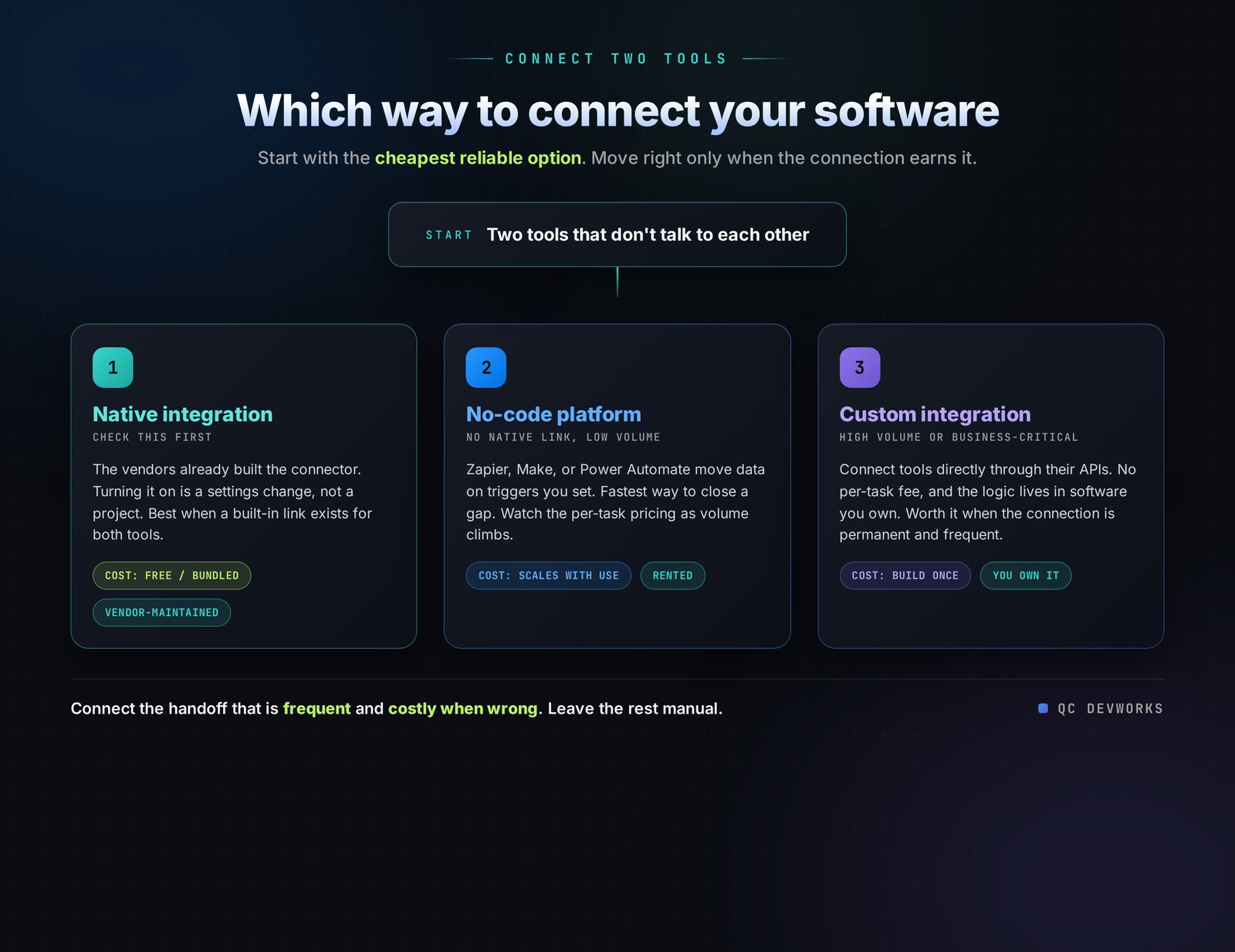
There are three practical ways to connect business software that does not talk to each other: native integrations built into the tools, a no-code automation platform that sits between them, and custom integrations built directly against each tool’s API. Each fits a different level of complexity, volume, and risk, and most real stacks end up using a mix.
Option 1: Native integrations
Native integrations are connections the software vendors already built, and they are the first thing to check before you pay for anything else. If your CRM has a built-in connector to your accounting tool or your form builder, turning it on is usually a settings change, not a project. Native integrations are reliable because the vendor maintains them, and they are free or bundled into plans you already pay for.
The limitation is that native integrations only exist for popular tool pairings, and they rarely do exactly what your workflow needs. A native CRM-to-accounting link might sync contacts but not the custom job fields you actually care about. Check native options first, then measure the gap between what they do and what your process requires.
Option 2: No-code automation platforms
No-code automation platforms like Zapier, Make, and Power Automate sit between your tools and move data on triggers you define, without anyone writing code. When a form is submitted, create a CRM contact. When a deal is marked won, draft an invoice. These platforms connect thousands of apps and are the fastest way to close a gap when no native integration exists.
The catch is cost and durability at volume. Zapier, as of June 2026, starts free at 100 tasks per month, and its Professional plan runs about 49 dollars per month for 2,000 tasks, but the price scales with how often your automations run. A single multi-step automation firing a few hundred times a day can push you into the hundreds of dollars per month and into higher tiers. No-code platforms are excellent for low-to-moderate volume and for testing whether a connection is worth keeping. They get expensive and harder to govern when a workflow becomes core to how money moves through your business.
Option 3: Custom integrations
Custom integrations connect your tools directly through their APIs, so the logic lives in software you own instead of a per-task subscription. This is the right approach when a connection runs at high volume, carries real business risk, needs logic the no-code tools cannot express cleanly, or has to survive for years without breaking. A custom automation or internal tool does not bill you per task and can encode the exact rules your operation runs on.
Custom work costs more to build than flipping on a no-code zap, so it is not the answer for every gap. It pays off when the connection is permanent, frequent, and important enough that an outage or a surprise bill would actually hurt.
Which integrations are worth building, and which to leave alone
The most important integration decision is which gaps to close and which to tolerate, because connecting everything is a waste of money. A good connection removes repeated manual work on data that matters and runs often. A bad connection automates something that happens twice a month or links data nobody downstream actually uses.
Before you connect two tools, run each candidate handoff through four questions:
- Frequency: How many times a week does a person move this data by hand? Daily handoffs are strong candidates. Monthly ones rarely are.
- Error cost: What happens when the manual version is wrong? A mistyped phone number is annoying. A mistyped invoice amount or a missed lead is expensive.
- Stability: Is this workflow settled, or still changing every few weeks? Automating a process that is still in flux means rebuilding the automation constantly.
- Ownership: Does anyone actually own the downstream data? If no one trusts or uses the destination system, connecting to it just moves bad data faster.
Handoffs that score high on frequency and error cost, and are stable enough to commit to, are the ones worth connecting. Everything else can stay manual until it earns automation. We walk through this same filtering in how to find the workflows worth automating.
A simple decision path
The diagram below shows the order we use when deciding how to connect two tools. Start with the cheapest reliable option and only move toward custom work when the connection earns it.
The real cost of staying disconnected
Disconnected systems cost far more than their subscriptions, because the expense shows up as staff time and errors rather than line items on an invoice. Industry estimates put the time businesses lose to manual data entry as high as 30 percent of working hours in data-heavy roles, and small and mid-size firms can lose six figures a year to bad or duplicated data once you count wasted time, error correction, and missed opportunities (Netguru, 2025). Human error rates for manual data entry typically run between 1 and 5 percent depending on complexity, and each error gets more expensive the further it travels before someone catches it.
You do not need the national averages to find your own number. Pick one repeated handoff. Estimate how many minutes it takes, how many times a week it happens, and roughly what the person doing it earns. Multiply it out across a year. Most owners are surprised how fast a “quick” two-minute copy-paste turns into a meaningful annual cost, and that is before you count the errors it produces.
Manual process versus connected system
The table below compares the same lead-to-invoice flow done by hand against a connected version. The difference is not just speed. It is whether your data stays trustworthy as it moves.
| Step | Manual process | Connected system |
|---|---|---|
| New lead arrives | Someone reads the form email and retypes it into the CRM | Form writes the lead straight into the CRM |
| Lead becomes a customer | Details copied again into the quoting tool | CRM record carries into quoting automatically |
| Deal is won | Invoice rebuilt by hand in accounting | Won deal drafts the invoice with the right details |
| Status changes | Updated in one place, stale everywhere else | One update, consistent across systems |
| Reporting | Three exports stitched together in a spreadsheet | One source of truth, ready to read |
The manual column is not hypothetical. It is how most stacks run before anyone connects them. The point of integration is not to look modern. It is to stop paying people to be the bridge between tools that should be talking on their own.
Where to start without breaking what works
Start with one high-frequency, high-error handoff and connect it with the cheapest reliable method, then measure before you do the next one. Trying to connect an entire stack at once is how integration projects stall and how live workflows break. One connection at a time keeps the risk contained and lets you confirm the data is actually flowing correctly before you depend on it.
A sensible first move for most Quad Cities service businesses is the lead path: get your website contact form writing directly into your CRM so no lead gets retyped or lost. It is high frequency, the error cost is real because a dropped lead is lost revenue, and it is usually quick to connect. From there, you follow the same decision path outward, one earned connection at a time.
If you are not sure which handoffs are quietly costing you the most, that is exactly what a systems review is for. QC Devworks offers a free operations audit that maps where your tools fail to talk to each other and which connections would actually pay for themselves. You keep the map whether or not we build anything.
Frequently asked questions
What does it mean when business software does not integrate?
It means two or more tools cannot exchange data automatically, so a person has to move information between them by hand. A lead entered in a form has to be retyped into the CRM, and a won deal has to be rebuilt as an invoice in accounting. The software works, but the handoffs between tools depend on manual copy-paste.
Is Zapier enough to connect my business tools?
Zapier and similar no-code platforms are enough for many small-business connections, especially at low to moderate volume. They become expensive when automations run hundreds of times a day, because pricing scales with task volume, and they can be harder to govern when a workflow becomes core to how money moves. For high-volume or business-critical connections, a custom integration you own is often cheaper and more durable over time.
How much does it cost to connect disconnected systems?
It depends on the method. Native integrations are often free or already bundled into plans you pay for. No-code platforms like Zapier start free and scale with usage, commonly landing in the tens of dollars per month for small workflows. Custom integrations cost more upfront to build but remove per-task fees and fit your exact process. The right starting point is usually the cheapest reliable option for each specific handoff.
Which integration should a small business build first?
Start with the handoff that happens most often and hurts most when it is wrong. For many service businesses that is the lead path, connecting the website contact form to the CRM so no lead is retyped or lost. Connect one high-value handoff, confirm the data flows correctly, then move to the next one.