


Effective inventory management for small businesses requires a connected workflow that links stock movement to the next required action, covering receiving, counting, reserving, reorder approval, purchasing, and reporting. Without that loop, businesses rely on disconnected records that cannot support reliable operational decisions.
Before selecting software, businesses should map their actual inventory path, identify where handoffs break down, and determine whether an off-the-shelf platform or a custom workflow layer better fits their operations. The priority is closing gaps between physical stock and the work that consumes it.
An inventory workflow for small business should connect the exact moment stock moves with the next action someone needs to take. If the count changes in the stockroom but the reorder decision still lives in a spreadsheet, a text thread, or one person’s memory, the business does not have an inventory system. It has a set of partial records that happen to describe the same pile of parts.
That gap shows up fast in Quad Cities shops, service companies, contractors, light manufacturers, specialty retailers, and professional teams that keep supplies, parts, samples, uniforms, equipment, or customer materials on hand. The owner may not need a full warehouse platform. The team may not need a complex ERP rollout. But they do need a workflow that makes receiving, counting, reserving, reorder approval, purchasing, restock, and reporting happen in the same operational loop.
Inventory management guides often start with software categories. That can be useful, but it skips the harder question: what exactly should happen when a box arrives, a part gets used, a count is wrong, or a reorder needs approval? The answer is the workflow. Software should support that workflow, not replace the need to define it.
Inventory workflow for small business starts with movement
An inventory workflow for small business starts by tracking movement, not by building a perfect spreadsheet. Every useful inventory system has to answer four plain questions: what came in, where did it go, what is committed to work, and what needs attention now?
The U.S. Chamber’s CO publication describes inventory processes as end-to-end oversight of stock items from purchase through sale. For a small operator, that end-to-end view matters because inventory is rarely isolated. Parts connect to jobs. Materials connect to quotes. Supplies connect to calendar commitments. Products connect to online orders, counter sales, or service promises.
If the system only shows a quantity, it is incomplete. The operator also needs to know whether that quantity is available, reserved, damaged, waiting for approval, already on a vehicle, or sitting in the wrong location. That is why the workflow layer matters more than the inventory table itself.
The warning signs are usually operational, not technical
The clearest inventory problems appear as interruptions in daily work. A technician drives back for a part. A shop lead finds out a reorder was never placed. A counter person promises an item that was already committed to another job. An owner gets asked the same approval question three times because the purchasing trail is scattered.
Common signs include:
- Counts are updated after the work is done, not when the item moves.
- Reorder points exist, but no one trusts them enough to act.
- One person knows vendor lead times, substitutions, or minimum order rules.
- Job materials are pulled from stock without being reserved against the job.
- Cycle counts find the same mismatch every month.
- Purchasing decisions happen in email, but receiving happens somewhere else.
- The owner can see what was bought, but not why it was bought.
These are not just clerical issues. They are workflow design issues. The fix may involve inventory software, a custom internal tool, a portal, barcode scanning, an integration, or a lighter approval queue. The right answer depends on where the handoff breaks.
Map the loop before choosing inventory software
A small business should map the inventory loop before comparing platforms. The map does not need to be fancy. It needs to show the path from receiving to use, reorder, approval, purchase, and restock.
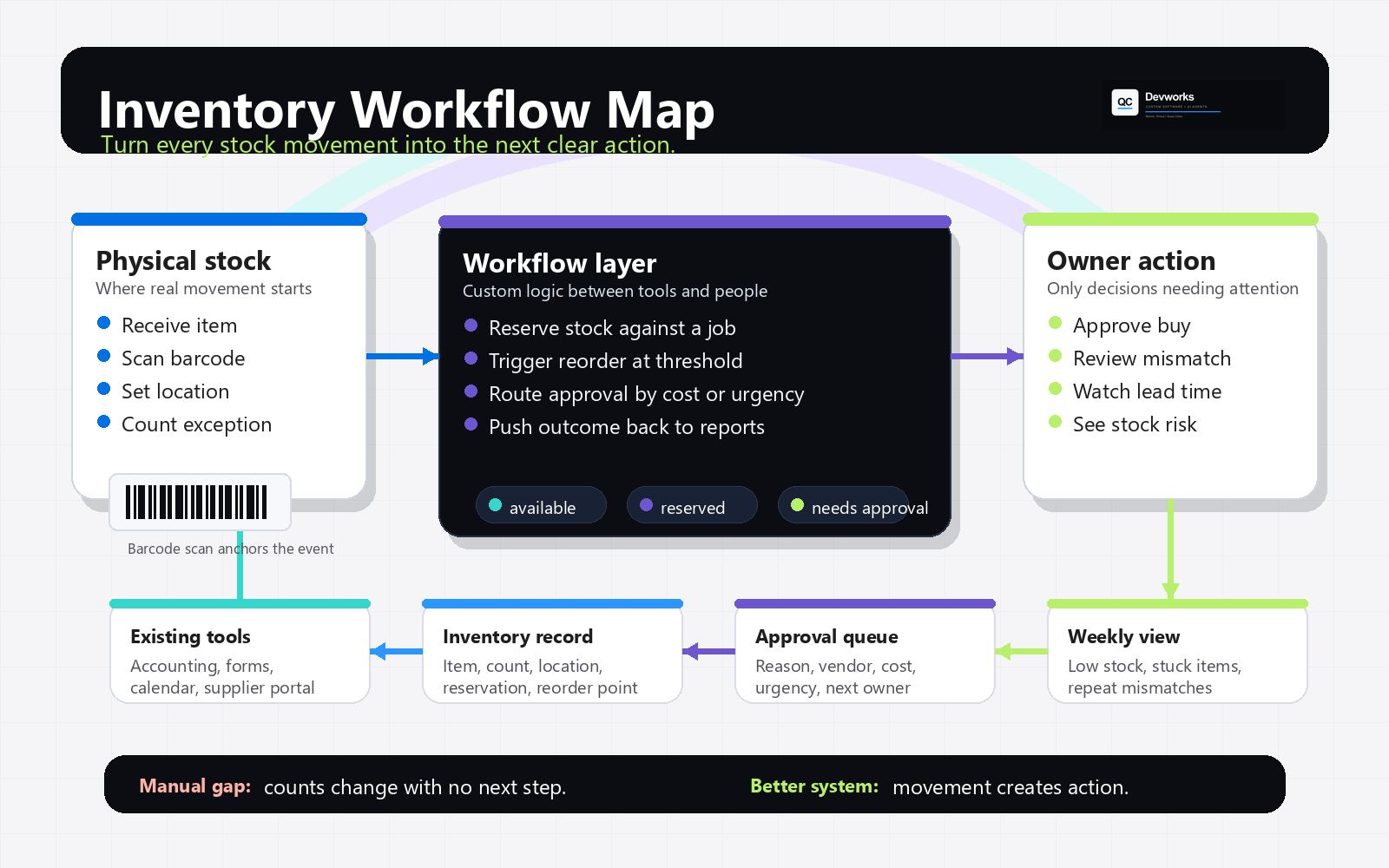
The map should name the people, systems, and decisions involved at each step. For example, receiving may happen at the parts counter. Usage may happen on a job ticket. Purchasing may happen in QuickBooks, email, or a supplier portal. Reporting may happen in a weekly owner review. If those steps are disconnected, a new app may only create another place to check.
This is where workflow systems become useful. The goal is not to make inventory more complicated. The goal is to remove dead zones where the business knows something happened but no system turns that knowledge into the next decision.
Manual process vs better owned workflow system
The manual process usually works until the business adds volume, locations, people, or urgency. A spreadsheet can track quantities. A shared inbox can handle reorder requests. A manager can remember which vendor ships fastest. But those pieces do not automatically agree with one another.
A better owned workflow system does not have to replace every tool. It can sit between the places where work already happens. It can capture a scan at receiving, reserve stock against a job, trigger an approval when a threshold is crossed, and create a clean handoff to purchasing. That may be a custom portal, a lightweight internal app, a database-backed form, or a small integration layer between existing tools.
The difference is accountability. In a manual process, the team asks, “Did someone update the sheet?” In a better system, the stock movement creates the next action automatically, and the owner can see where the action stands.
What to connect first
The first connection should be the one that removes the most operational confusion. For many small businesses, that is not forecasting. It is the basic handoff between physical stock and the work that consumes it.
1. Receiving and location
Start with a clean receiving step. The system should capture item, supplier, quantity, date, cost signal if needed, and location. If barcodes are part of the workflow, use identifiers consistently. GS1 US explains that GTINs and GLNs help uniquely identify products and locations, which is useful when a business sells through retail, ecommerce, distributors, or multiple locations. For purely internal parts, the same discipline still applies: one item, one identifier, one location rule.
2. Cycle counts and discrepancy review
Do not wait for a full physical inventory to discover that the number is wrong. A practical system lets the team count smaller groups on a regular rhythm, flag mismatches, and route exceptions for review. The important part is not just the count. It is what happens when the count does not match the record.
3. Reservation against real work
Available stock and on-hand stock are not the same thing. If three parts are on the shelf but two are committed to tomorrow’s job, the business has one available part. The workflow should make that visible to the person quoting, scheduling, ordering, or promising delivery.
This is especially important for service businesses, manufacturers, and trades where parts are tied to a job, vehicle, customer, build, or scheduled appointment. A simple reservation step can prevent the same item from being promised twice.
4. Reorder trigger and approval
A reorder point is only useful if it creates a decision. The workflow should decide what happens when stock drops below the threshold. Does it create a purchase request? Does it bundle items by supplier? Does it require owner approval above a dollar amount? Does it suggest a substitute? Does it wait for a job to be confirmed?
This is where an internal tool or approval queue can be more useful than another spreadsheet column. The owner does not need every detail every time. They need the exception, the reason, the cost range, the vendor, and the consequence of waiting.
5. Purchasing, restock, and reporting
The workflow should close after the purchase is received. If the system sends a purchase request but never confirms restock, the loop remains open. The team still needs to know what arrived, what was short, what changed price, and what should update the next reorder decision.
Reporting should focus on decisions, not vanity charts. Useful views include low-stock exceptions, items reserved for upcoming work, slow-moving stock, repeat discrepancies, vendor lead-time issues, and approvals waiting on the owner.
When off-the-shelf inventory software is enough
Off-the-shelf inventory software is often the right choice when the business workflow matches the product’s assumptions. If the team mostly needs product counts, purchase orders, barcode scanning, simple locations, integrations with accounting, and standard reports, a packaged platform may cover the need faster than custom software.
The best fit usually appears when the business can adapt its process without losing what makes the operation work. If the platform’s receiving, location, purchasing, and reporting model is close to reality, use it. QC Devworks does not need to rebuild what a mature platform already handles well.
The caution is forcing the business into a generic workflow when the real operation depends on job reservations, service vehicles, kits, customer-owned materials, supplier exceptions, approval rules, or local handoffs that the platform cannot model cleanly.
When a custom workflow layer is better
A custom workflow layer is better when the business already has tools that should stay, but the handoffs between them are weak. This is common when accounting lives in one system, quotes in another, scheduling in a calendar, forms on the website, and inventory in a spreadsheet or platform that no one fully trusts.
That layer may connect a form to a database, a parts scan to a job record, a reorder request to owner approval, and a purchase outcome back to reporting. It may also pull from existing software APIs instead of replacing the source system. For teams with unusual operations, this can be more practical than buying another subscription and asking employees to maintain one more place.
This is the same build-or-connect decision covered in custom software development. The useful question is not “Can we build inventory software?” The better question is “Which broken handoff is costing the business the most trust, time, or visibility?”
Security and access still matter
Once an inventory workflow becomes part of daily operations, access control matters. Not every employee needs to change item setup, vendor details, approval thresholds, costs, or reporting views. A receiving role, shop role, purchasing role, and owner role may each need different permissions.
The NIST Cybersecurity Framework 2.0 Small Business Quick-Start Guide, published in 2024, recommends understanding the assets a business relies on by maintaining inventories of hardware, software, systems, and services. That guidance is about cybersecurity risk, but the operating lesson is relevant here too: know which systems the business relies on, who can touch them, and what happens if they are wrong.
How QC Devworks scopes an inventory workflow
QC Devworks scopes an inventory workflow by starting with the operational path, then choosing the smallest technical system that can make the path reliable. For a Quad Cities manufacturer, that may mean connecting RFQ materials, stock reservations, and purchasing. For a service company, it may mean tying parts to scheduled jobs and vehicle restock. For a local retailer, it may mean connecting online orders, counter sales, and reorder approvals.
The process usually starts with an audit of the actual movement:
- Where stock enters the business.
- Who touches it before it is used or sold.
- Where the count becomes unreliable.
- Which approvals slow the work down.
- Which existing systems should stay.
- Which report the owner actually needs each week.
From there, the technical answer may be a custom internal app, an integration between existing platforms, a small portal, a better approval queue, or a focused workflow database. The point is not to chase a bigger system. The point is to make the daily loop visible enough that the business can act before stock issues turn into customer, schedule, or cash-flow problems.
If inventory is becoming one of the places where work stalls, QC Devworks can help map the workflow, identify the weak handoffs, and build the practical layer that connects the tools you already use. Start with the QC Devworks process, or book a free operations audit when you are ready to turn the stockroom process into a system the business can trust.