
In this field note
Connecting business tools does not automatically keep their data consistent. When multiple systems can write to the same field, records diverge through overwrites, duplicates, and silent sync failures. Assigning each field a single owning system, while others only read it, eliminates most drift.
A reliable matching key prevents duplicate records by giving the sync a stable way to identify existing entries. Basic monitoring, including failure alerts and periodic spot checks, catches problems before they compound. Starting with one well-governed entity, such as the customer record, is more effective than attempting a full overhaul at once.
Once you connect your tools, a new problem shows up that the integration was supposed to fix: the same customer looks different in every system. The CRM says one phone number, the quoting tool says another, accounting has a third address, and nobody knows which one is right. Connecting your software was the first job. The harder, quieter job is learning how to keep CRM data in sync across those connected systems so the record you trust today is still the record you trust next month. This guide covers why synced systems still drift, the one rule that stops most of it, and how to set this up without a full data platform.
QC Devworks is a Quad Cities software studio that builds workflow systems and the custom software that holds them together. We see drift constantly, almost always for the same handful of reasons, and the fix is more about decisions than technology.
Why connected systems still fall out of sync
Connected systems fall out of sync because a connection moves data but does not decide who is allowed to change it. The moment two tools can both write to the same field, you have a race. Whoever saved last wins, and the value that loses just disappears without a warning. A sync pipe with no ownership rule does not create one source of truth. It creates two sources that occasionally overwrite each other.
Most drift traces back to four specific causes, and naming them is the first step to fixing them.
- No single owner per field. Both the CRM and the quoting tool let staff edit the phone number, so the field has two masters and no referee.
- Weak matching keys. The sync has no reliable way to tell that two records are the same person, so instead of updating the existing record it creates a duplicate.
- Timing and partial updates. One system pushes an update while another is mid-edit, and the sync lands a half-correct record that looks fine until someone reads it closely.
- Silent failures. A sync errors out at 2 a.m., nobody is watching the log, and the two systems quietly diverge for a week before anyone notices.
None of these are exotic. Independent reviews of CRM integrations list the same failure modes again and again: missing records, duplicates, stale fields, and wrong ownership (Insycle, 2025). The good news is that the same short list of fixes covers almost all of them.
The one rule that will keep CRM data in sync
The single most effective way to keep CRM data in sync is to give every field exactly one owning system, and let every other system read that field without editing it. This is the rule that does the most work for the least effort. When only one system can change a value, there is no race to lose, no last-save-wins surprise, and no question about which copy is correct. The owner is correct by definition, and everyone else displays what the owner says.
The hard part is not understanding the rule. It is sitting down and deciding, field by field, who owns what. The matrix below shows how that looks for a typical service business running a CRM, a quoting tool, and accounting software.
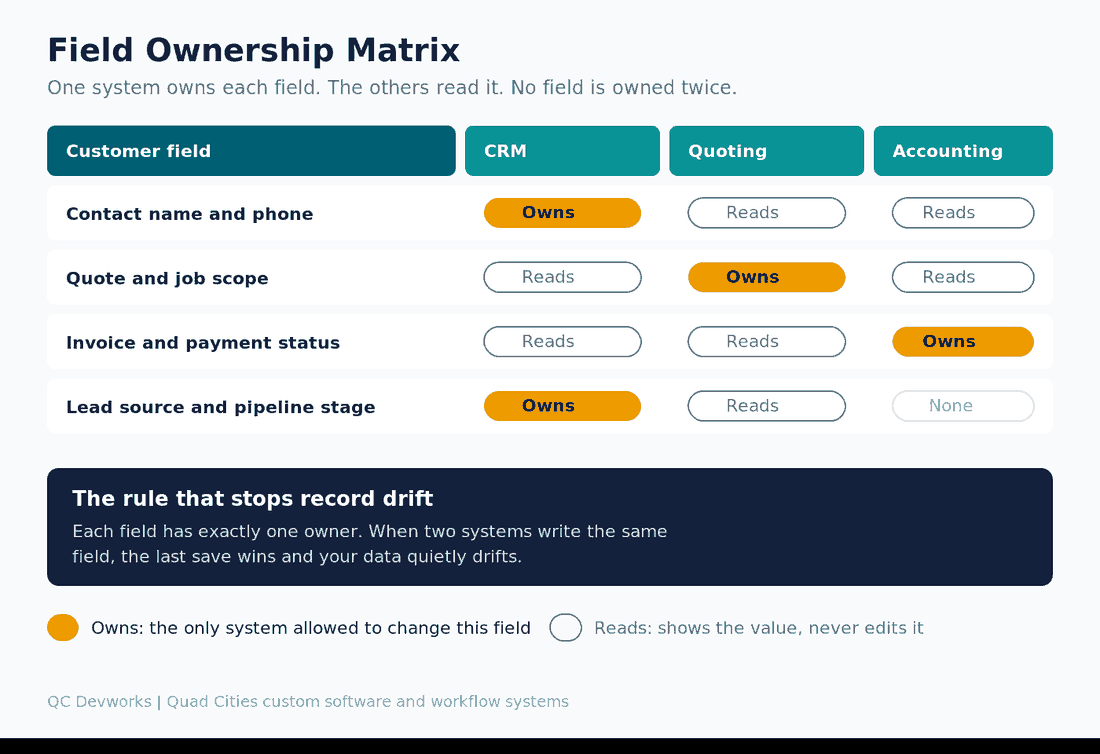
Contact details are owned by the CRM because that is where new customers enter the business. Quote and job scope are owned by the quoting tool because that is where the work is defined. Invoice and payment status are owned by accounting because that is the system of record for money. The point is not these exact assignments. The point is that no field has two owners, so nothing can quietly overwrite anything else.
How to build your own ownership map
You can build a field ownership map in an afternoon with a spreadsheet and the people who actually use the systems. List your important customer fields down the side and your systems across the top. For each field, mark exactly one system as the owner and the rest as readers. The argument that happens during this exercise is the valuable part, because it surfaces the fields two teams both think they control. That overlap is precisely where your drift is coming from.
Industry guidance on syncing CRMs lands in the same place: a field ownership matrix that records which system is authoritative for each field is the single most important governance document in any integration (Stacksync, 2025). You do not need their tooling to get the benefit. You need the decision written down and enforced.
Stop duplicates before they start with matching keys
Duplicates happen when the sync cannot tell that two records are the same person, so the fix is to give it a reliable matching key. A matching key is the field the sync uses to decide update versus create. Pick a primary key that is stable and unique, usually email for a contact or domain for a company, and a fallback like phone number for when the primary is missing. Without a matching key, every sync run risks creating a second copy of someone who already exists, and now you are back to two records fighting over the truth.
Once a duplicate exists, it is much harder to clean up than it was to prevent, because both copies may have real data attached to them. Merging has to fold both into one surviving master record that the sync recognizes, or the connection breaks again on the next run. This is why prevention through a clean matching key beats cleanup every time. Decide your keys before you turn the sync on, not after the duplicates pile up.
Off-the-shelf sync tool versus an owned workflow system
For most small businesses, an off-the-shelf sync tool is the right starting point, and an owned workflow system becomes worth it only when the connection turns business-critical. Tools like native integrations and no-code platforms can enforce a matching key and a basic direction of flow, which is enough when volume is modest and the rules are simple. They are fast to set up and cheap to test.
They start to strain in three situations. The first is volume, where per-task pricing climbs as the sync fires hundreds of times a day. The second is logic, where your real ownership rules are too nuanced for a simple trigger and action. The third is visibility, where you need to know immediately when a sync fails instead of finding out a week later. When a synced connection becomes part of how money moves through the business, an owned automation or internal tool that encodes your exact ownership rules and alerts you on failure is usually cheaper and far more durable than stretching a no-code tool past its limits. We walk through that build-versus-buy line in more detail in how to connect business software that does not talk to each other.
Manual reconciliation versus a synced system with ownership
The comparison below shows the same customer-data problem handled three ways. The middle column, a sync with no ownership rule, is where most businesses get stuck. It feels like progress but still produces drift.
| Situation | Manual reconciliation | Sync without ownership | Sync with field ownership |
|---|---|---|---|
| Customer changes phone number | Updated in one system, stale in the rest | Updated in two systems, last save wins | Updated only in the owning system, read everywhere |
| Same person enters twice | Two records, found by accident later | Duplicate created on next sync | Matching key updates the existing record |
| Sync or entry fails | Someone eventually notices | Systems diverge silently | Failure alert fires, owner stays correct |
| Reporting | Exports stitched together by hand | Numbers disagree between systems | One authoritative value per field |
The difference between the last two columns is not the connection. Both are connected. The difference is whether anyone decided who owns each field.
Catch drift early with monitoring you actually see
A sync you do not monitor is a sync you cannot trust, because the failures that cause the worst drift are the silent ones. The fix does not have to be elaborate. You need two things: a log of what the sync did, and an alert that reaches a real person when something fails. Without the alert, a connection can be broken for days while both systems keep serving confident, wrong answers to your staff and customers.
Practical monitoring for a small business can be as simple as a failure notification in email or a team chat, plus a short weekly spot check of a few records across systems to confirm they still agree. The goal is to find drift in days, not quarters. Continuous logging and monitoring is standard advice in every serious treatment of data synchronization, and it is the step most small teams skip until a sync silently fails once and teaches them why it matters (Dataversity, 2025).
Where to start without rebuilding everything
Start with one entity, usually the customer or contact, and get its ownership map and matching key right before you touch anything else. Trying to sort out ownership for every object at once is how these projects stall. One clean, well-owned, well-monitored customer record is worth more than a half-finished plan that covers everything and enforces nothing.
A sensible first sequence is short. Write the field ownership map for your customer record. Set a primary and fallback matching key. Turn on the sync in the direction ownership dictates. Add a failure alert. Then watch it for two weeks before you extend the same pattern to quotes, jobs, or invoices. Each new entity follows the same four steps, one at a time. This is the same one-handoff-at-a-time discipline we use when deciding which workflows are worth automating in the first place.
If you are not sure which records are drifting or which fields have two owners, that is exactly what a systems review is for. QC Devworks offers a free operations audit that maps where your connected tools disagree and which ownership rules would stop the drift. You keep the map whether or not we build anything.
Frequently asked questions
Why does my CRM data get out of sync even though my tools are connected?
Because a connection moves data but does not decide who is allowed to change each field. When two systems can both edit the same value, the last save wins and the other value is lost. Connected tools still drift until you assign each field one owning system and let the rest read it without editing.
What is the fastest way to keep CRM data in sync?
Give every field exactly one owning system and a reliable matching key. Field ownership stops two systems from overwriting each other, and the matching key stops the sync from creating duplicates. Those two decisions prevent most drift before you add any monitoring or custom tooling.
Do I need a custom integration to keep my systems in sync?
Not at first. Native integrations and no-code platforms can enforce a matching key and a flow direction, which is enough at modest volume with simple rules. A custom integration becomes worth it when the sync runs at high volume, encodes nuanced ownership logic, or needs reliable failure alerts because the connection is business-critical.
How do I stop duplicate records when systems sync?
Set a primary matching key that is stable and unique, usually email for a person or domain for a company, with a fallback like phone number. The sync uses that key to update the existing record instead of creating a new one. Decide your keys before turning the sync on, because preventing duplicates is far easier than merging them later.