

In this field note
A custom internal tool is not the right answer every time a business gets frustrated with software. Sometimes the right move is to keep the SaaS tool, clean up how it is configured, or connect it to the rest of the stack. The build decision becomes serious when another subscription would only add one more login, one more export, and one more place for work to disappear.
That is the point where Quad Cities owners and operators need a practical build, buy, or connect decision. The question is not whether custom software sounds better. The question is whether the workflow is important enough, specific enough, and painful enough to justify an owned system.
When a custom internal tool is worth building
A custom internal tool is worth building when the workflow itself is part of how the business runs, not just a generic task that any decent SaaS product can handle.
Buying software is usually the right first move for standard functions: accounting, payroll, basic email, file storage, chat, and other mature categories where the market has already solved the common problem. Building those from scratch would usually create avoidable maintenance risk.
The build conversation changes when the work crosses departments, tools, and local operating rules. A service company may have leads entering through a form, estimates living in email, scheduling in a calendar, job notes in a spreadsheet, and follow-up reminders in somebody’s head. Adding another app may help one step while making the whole route harder to see.
In that case, the better question is: what system should own the workflow?
Start with the operational problem, not the software category
The fastest way to make a bad software decision is to start with a category name instead of the actual work.
Most teams do not wake up needing a CRM, portal, dashboard, AI agent, or project management system. They need a way to stop losing handoffs. They need quotes to move from intake to review. They need the owner to see exceptions without reading every email. They need the office to know which jobs are waiting on parts, approval, payment, photos, or a customer response.
That is why QC Devworks usually frames the decision around workflow state. What is the current state of the job, request, quote, account, order, ticket, or approval? Who can change it? What happens next? What data has to move with it?
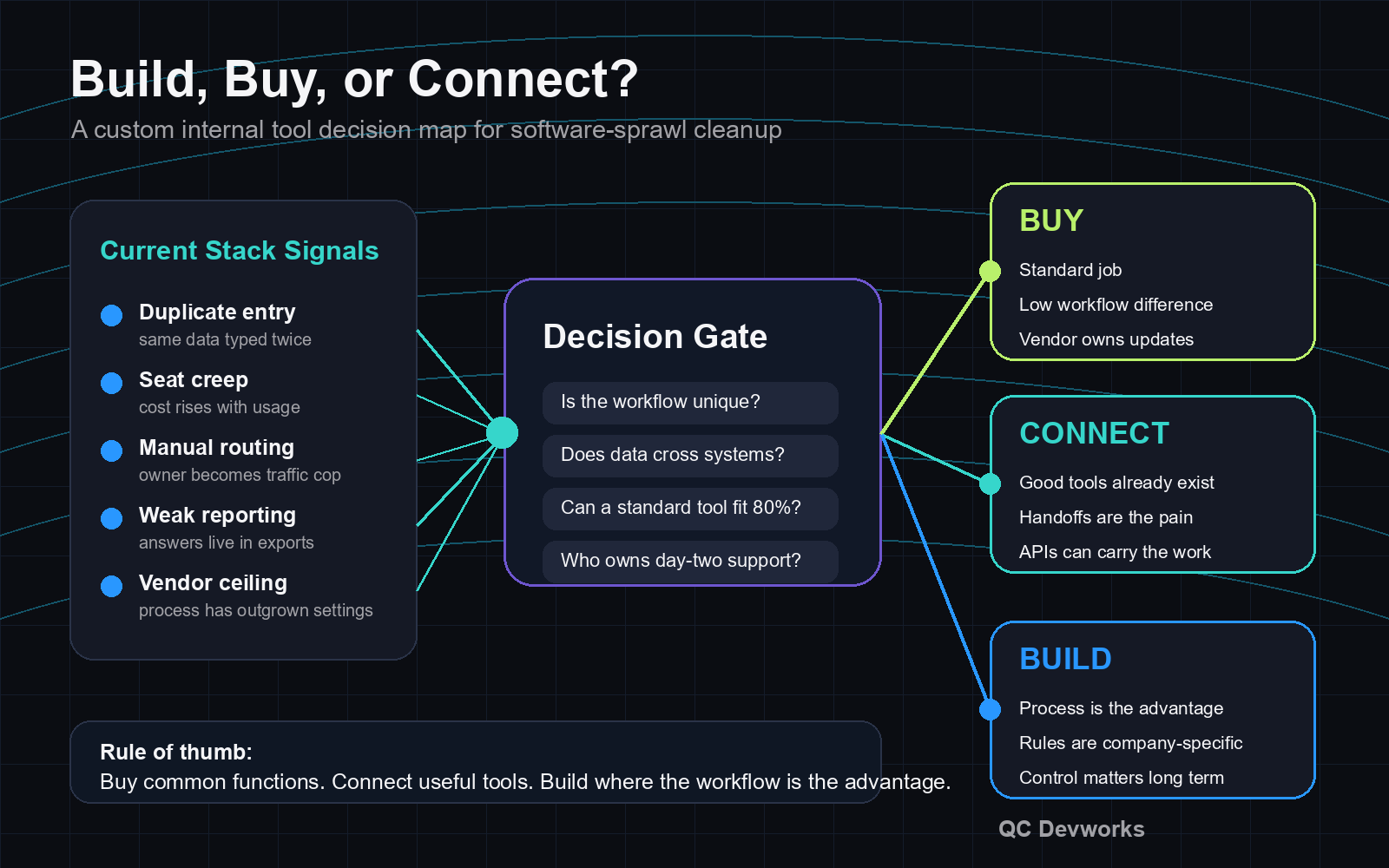
If a standard tool can answer those questions cleanly, buy it. If two good tools already exist but do not pass the right data between them, connect them. If the business keeps bending around the software instead of the software supporting the work, a custom internal tool belongs on the table.
Five signs another SaaS subscription will not fix the workflow
Another SaaS subscription is a weak fix when the pain comes from ownership, routing, and visibility rather than missing features.
1. The same data is entered more than once
Duplicate entry is a systems problem. If a customer name, job address, estimate detail, part number, or deadline has to be typed into multiple tools, the business is paying people to reconcile its software. A new app may make one screen nicer, but it will not solve the underlying data route unless it becomes the source of truth or connects to it cleanly.
2. The owner is still the router
If every unusual request waits for the owner to decide where it goes, the problem is not just software selection. The workflow needs rules. A useful internal tool can encode those rules: route this request to estimating, flag this one for approval, send this one to scheduling, and hold this one until the missing field is supplied.
3. Reporting depends on exports
Exports are useful for analysis, but they are weak as a daily operating system. If the team has to pull CSV files, merge tabs, and message around screenshots to know what is happening, the business does not have owner visibility. It has manual reporting labor.
4. Work lives in too many inboxes
Email is good for conversation. It is poor as a queue. When job status, files, approvals, and customer promises are scattered through inboxes, nobody can reliably see the full operational state without asking around.
5. The process is specific to how the company wins work
Some workflows are generic. Others are part of the business model. A manufacturer quoting repeat parts, a contractor dispatching crews by constraints, a professional service firm routing approvals, or a local retailer managing special orders may need logic that a generic subscription will never quite match.
Buy the tool when the job is standard
Buying is usually the strongest choice when the process is common, the market has mature options, and the tool does not need to express a unique operating method.
A good SaaS product can be faster to launch, easier to support, and safer than a custom build for work that has already been solved well. That includes standardized accounting, commodity scheduling, simple email campaigns, payroll, basic document signing, and other mature categories. The vendor maintains the product, handles routine updates, and spreads development cost across many customers.
The catch is fit. Buying stops being simple when the tool asks the business to change important workflow rules, when seat pricing punishes normal growth, when data access is limited, or when reporting only works inside the vendor’s preferred view.
Retool’s current build-vs-buy internal tools guide makes a similar point from an engineering perspective: buying can move faster when requirements are not highly bespoke, while building creates long-term maintenance responsibilities. For a small business, that tradeoff should be translated into operator language: does the tool reduce daily friction, or does it just move the friction somewhere else?
Connect existing tools when the stack is useful but fragmented
Connecting tools is the right middle path when the business already has useful software, but the handoffs between those tools are causing the real waste.
This is common in small-business operations. The CRM may be fine. The calendar may be fine. The form may be fine. The quoting spreadsheet may even be fine for now. The failure is that no system owns the route from request to scheduled work to follow-up.
An integration layer can move the right fields, trigger notifications, create records, update statuses, and reduce copy-paste work without replacing everything. This is often the first serious step before a custom build, because it shows which parts of the current stack deserve to stay and which parts keep creating drag.
QC Devworks treats this as a systems design decision, not a connector shopping exercise. Useful integrations need clear ownership: what system is the source of truth, what fields can be edited where, what happens when an API fails, and who receives an exception.
That ownership matters for security too. As of June 2026, the NIST Cybersecurity Framework still frames cybersecurity risk around outcomes such as govern, identify, protect, detect, respond, and recover. For internal tools and integrations, that means a practical business system should account for access, ownership, logging, and recovery from the beginning rather than after the first failure.
Build the custom internal tool when the workflow is the asset
Building is the right choice when the workflow is specific, valuable, and hard to run inside someone else’s assumptions.
A custom internal tool does not have to replace the entire software stack. Often it becomes the operational layer that sits above the stack. It gives the team one place to see the queue, rules, exceptions, and next actions, while still using existing systems for accounting, email, files, or calendars.
That is the difference between building a whole company platform and building the missing operating surface. The second option is usually more realistic for a small business. It can start with the workflow that causes the most owner intervention, then expand only when the usage proves the value.
Good candidates include:
- Quote review consoles where requests, files, pricing inputs, and approvals need one route.
- Dispatch boards where jobs move by crew, location, equipment, urgency, or customer promise.
- Operations dashboards where the owner needs exceptions, not vanity charts.
- Customer or vendor portals where repeated status questions are slowing the office down.
- Approval queues where work waits because responsibility is unclear.
These are not generic website or marketing problems. They are operating problems. The value comes from reducing handoff loss, shortening decision loops, and making the current state of work visible.
Manual process vs better system: what changes after the build
A better system changes who owns the next step, what information is trusted, and how exceptions reach the right person.
| Manual process | Better owned system |
|---|---|
| Requests arrive by form, email, phone, and text with no shared state. | Requests enter one queue with required fields, status, owner, and next action. |
| The owner forwards messages and asks the team for updates. | Rules route common work automatically and surface only exceptions. |
| Reports are rebuilt from exports when someone asks. | Dashboards read from the workflow as the work changes. |
| Approvals hide in inboxes or message threads. | Approvals have a queue, timestamp, owner, and decision record. |
| Software decisions are made app by app. | The stack is judged by how well it supports the whole workflow. |
This is where a custom internal tool earns its keep. It does not just add software. It gives the business a defined operating model.
How to scope a custom internal tool without overbuilding
The safest first version is the smallest tool that proves the workflow can be owned, measured, and improved.
Start with one painful route. For example: web request to qualified estimate, estimate to approval, approved job to scheduled work, or completed job to follow-up. Define the states, required fields, roles, exceptions, and success measures. Then decide which current tools should stay connected.
A practical first scope should answer:
- What workflow will this tool own?
- What current tools must it read from or write to?
- Who changes status, and who only views it?
- What exception should wake up the owner?
- What records must be kept for support, audit, or handoff history?
- What part of the current process should remain manual for now?
CISA’s Secure by Design guidance is aimed at software manufacturers, but the principle applies here too: security and operational responsibility should be designed into software rather than bolted on after launch. For a small internal tool, that means role-based access, sensible defaults, logging where it matters, and a plan for maintenance.
How QC Devworks approaches the decision
QC Devworks starts by mapping the workflow, the current stack, and the owner bottlenecks before recommending a build.
That may lead to custom software development. It may lead to an internal tool that sits on top of existing systems. It may lead to a lighter workflow system that connects forms, email, calendars, and reporting. It may also show that the business should keep the current SaaS product and clean up the process around it.
The point is to avoid buying another subscription just because the stack feels messy. The better move is to identify where the work breaks, what the business needs to control, and which system should own the path forward.
If your team is carrying too many logins, exports, and manual handoffs, the software waste audit is a practical place to start. For a broader service view, see what QC Devworks builds, or book a free operations audit to talk through the workflow directly.
Bottom line: build only where ownership matters
A custom internal tool makes sense when ownership of the workflow matters more than access to another feature list.
Buy standard tools. Connect useful tools. Build when the workflow is specific to how your business runs, when the handoffs create real operational waste, and when the owner needs a clearer control surface than another SaaS tab can provide.