

In this field note
Spreadsheets become problematic not because of the tool itself, but because of the operational roles they accumulate over time. A three-question framework helps determine when replacement is warranted: whether multiple people edit the file weekly, whether others wait on it to do their work, and whether it triggers real-world events like orders or invoices.
Research shows spreadsheet errors are present in nearly all large operational files and often go undetected. Before building custom software, low-cost fixes like shared cloud copies, protected ranges, and input validation are worth attempting. When those fall short, a focused web portal can formalize the workflow with structured fields, role-based access, and an audit trail.
Somewhere in your business there is a file with a name like Schedule_Master_v7_FINAL_USE_THIS_ONE.xlsx, and half the company quietly waits on it every morning. If that sounds familiar, you are already circling the real question: when should you replace spreadsheets with custom software, and when is the spreadsheet honestly fine? The answer is not “always build an app.” Plenty of spreadsheets deserve to stay spreadsheets, and anyone who tells you otherwise is selling something. This guide gives Quad Cities owners and operators a three-question load test for the decision, the research on why spreadsheet errors stay invisible, the cheap fixes worth trying first, and a clear picture of what a portal build actually involves when a file fails the test.
The Spreadsheet Is Not the Problem. The Job You Gave It Is.
Spreadsheets fail when they stop being analysis tools and start being shared operational systems. Excel and Google Sheets are exceptional at what they were designed for: one person exploring numbers, building a quick model, checking a margin, or pivoting data someone exported from another system. If a file has one owner and answers questions, it is doing its job.
The trouble starts when the file picks up a second job: running the operation. A quoting sheet becomes the quote log. The quote log grows a delivery tab. The delivery tab gains color codes that only one person can decode. Now the file is a database, a workflow tracker, a permissions system, and an audit trail, and a spreadsheet is none of those things. It has no record locking, no roles, no required fields, no history of who changed what, and no way to stop a sorted column from silently divorcing names from their numbers.
A spreadsheet is a brilliant calculator and a terrible database. Most of the pain Quad Cities businesses attribute to “messy spreadsheets” is really the pain of asking a calculator to be a system of record.
When to Replace Spreadsheets with Custom Software: The Three-Question Load Test
You should replace spreadsheets with custom software when more than one person edits the file every week, other people wait on it to do their jobs, and the file triggers real operational events like orders, schedules, invoices, or compliance records. If a file fails all three questions, it has already become a system. The only choice left is whether it becomes a deliberate one.
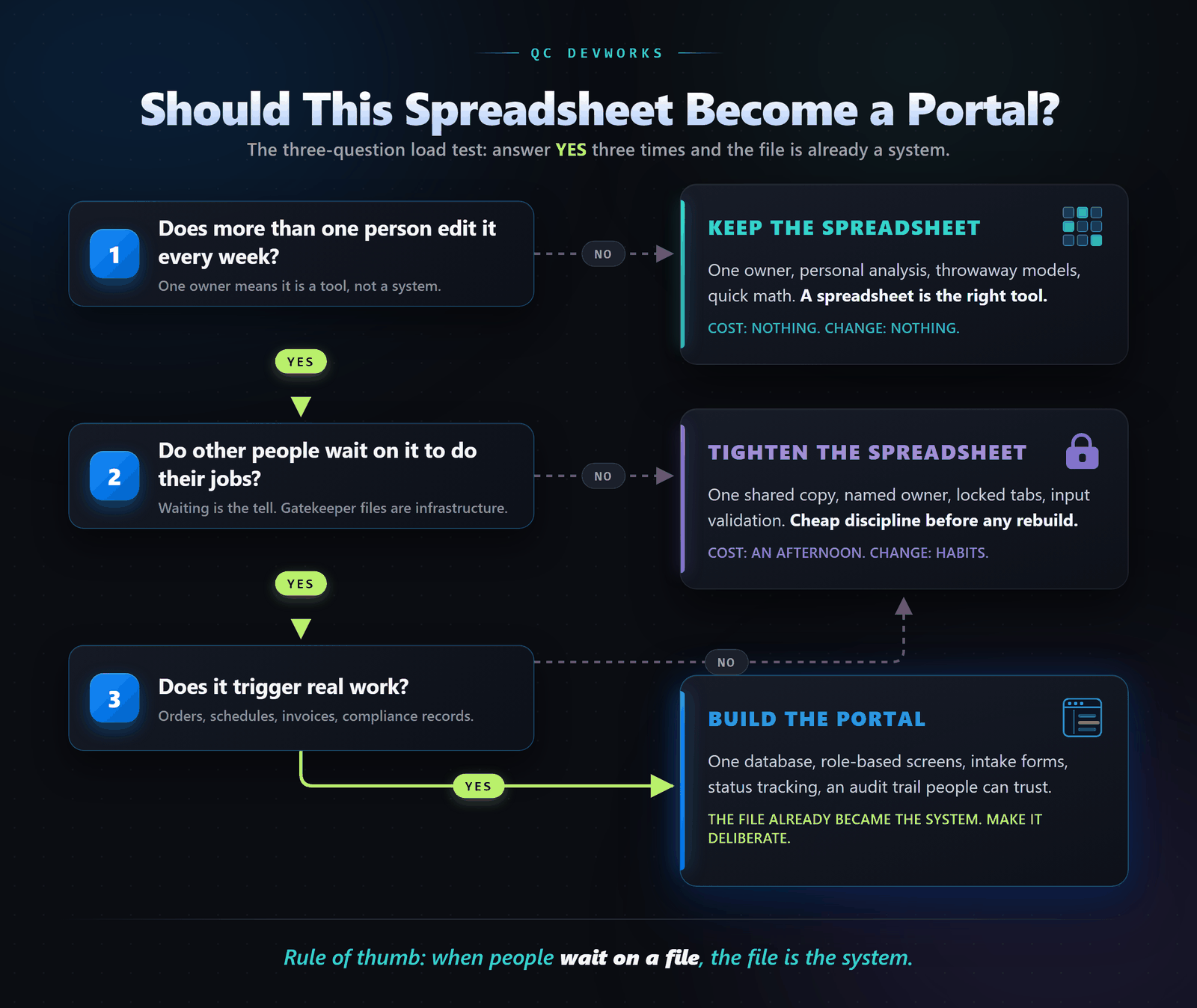
Question 1: Does more than one person edit it every week?
A file with one owner is a tool; a file with five editors is a contested workspace. Multi-editor files breed version conflicts, overwritten work, and the dreaded v7_FINAL naming convention. One regular editor means you can stop reading here and keep the spreadsheet. Two or three editors can sometimes be managed with discipline. Five editors across two departments means the file is carrying structural load it was never designed for.
Question 2: Do other people wait on it to do their jobs?
When a dispatcher, a billing clerk, or a shop lead cannot start work until someone else updates a file, that file has become infrastructure. Picture a property management office where unit turnovers stall every Monday because the turnover board lives in one coordinator’s spreadsheet, or a machine shop where the floor waits on a quote tracker before cutting material. The waiting is the tell. Files that gate other people’s work are systems wearing a spreadsheet costume.
Question 3: Does it trigger real work?
The highest-stakes spreadsheets are the ones that cause things to happen in the physical world: parts get ordered, crews get scheduled, invoices go out, safety checks get logged. When a typo in a cell can ship the wrong material or miss a compliance deadline, the cost of spreadsheet fragility is no longer measured in annoyance. Files that trigger orders, schedules, invoices, or regulatory records deserve required fields, validation, and an audit trail, which is to say they deserve actual software.
The Failure You Cannot See: What Error Research Shows
Spreadsheet errors are rarely visible until they cost money, and decades of audit research show they are present in almost every large operational file. Field audits compiled by University of Hawaii researcher Raymond Panko found that roughly 94 percent of audited spreadsheets contained at least one error, with average cell error rates in the low single digits (research compiled as of 2016). A few percent sounds survivable until you remember that an operational workbook can hold thousands of formula cells, and that errors compound as files are copied, extended, and inherited.
The research also found something more uncomfortable: people are consistently overconfident about their own spreadsheets. Errors hide because nothing in a spreadsheet announces them. A portal with validation rules rejects a bad entry at the door. A spreadsheet accepts it, formats it nicely, and feeds it into next month’s decisions.
Tighten the Spreadsheet Before You Replace It
The cheapest fix for a struggling spreadsheet is usually discipline, not software. Before anyone proposes a build, try the boring fixes first:
- One shared copy. Kill the email attachments. The file lives in OneDrive, Google Drive, or SharePoint, and there is exactly one of it.
- One named owner. Someone specific owns structure changes. Everyone else enters data.
- Locked tabs and protected ranges. Formulas and reference data get protected so a stray keystroke cannot quietly break March.
- Input validation. Dropdowns and data validation rules instead of free-typed customer names and status labels.
- Monthly snapshots. A dated archive copy, so there is a known-good version to fall back on.
Tightening works when the file serves one team with few handoffs. It stops working when the file fails questions two and three above, because no amount of cell protection gives you roles, history, or workflow. If you are weighing which of several creaky processes to fix first, our guide on finding the workflows worth automating walks through that triage.
What a Portal Actually Is
A portal is a small web application built around one database, with role-based screens for each kind of user and an audit trail underneath everything. It is not an ERP, it does not take a year, and it does not have to replace every tool you own. In a typical build, the spreadsheet’s columns become structured fields, its tabs become screens, its tribal color codes become named statuses, and its anxious Monday-morning ritual becomes a form submission with a timestamp.
The practical difference shows up in the daily mechanics:
| Moment | Shared spreadsheet | Portal |
|---|---|---|
| New job arrives | Someone retypes an email into a row | Intake form creates the record, required fields enforced |
| Status changes | A cell turns yellow, meaning known to one person | Named status updates, visible to everyone with access |
| Two people edit at once | Version conflict or overwritten work | Both records save; the database does not care |
| Something looks wrong | Archaeology through old file versions | Audit log shows who changed what, when |
| Owner goes on vacation | The operation slows down | The system keeps running |
This is the real pivot: a manual process asks people to be perfect, and a built system makes the easy path the correct one. That is the standard we apply to custom software development projects, whether the result is a quoting portal, one of the internal tools and dashboards that replace a wall of tabs, or the broader workflow systems that connect intake, scheduling, and billing into one path.
And no, you do not have to give up Excel. A good portal exports clean data on demand, which makes your spreadsheets better at the analysis work they were always meant to do.
How a Spreadsheet-to-Portal Migration Actually Goes
A good migration replaces one painful workflow first, keeps exports available, and runs the old file in parallel for a short, defined period. The sequence that works:
- Map the real workflow, not the spreadsheet. Document what people actually do, including the workarounds that never made it into the file.
- Pick the single worst bottleneck. Usually intake or status tracking. Resist the urge to rebuild everything at once.
- Clean the data once. Migration is the moment to fix duplicate customers and seventeen spellings of the same vendor.
- Run parallel briefly. The spreadsheet stays read-only as a safety net for a couple of weeks, then it retires to the archive.
- Add the next module only when the first one is boring. Boring means adopted, trusted, and stable. That is the signal to extend.
Frequently Asked Questions
How do I know if my business has outgrown spreadsheets?
Apply the load test: more than one weekly editor, people waiting on the file, and the file triggering real work like orders or invoices. Failing one question calls for tightening the spreadsheet. Failing all three means the file is already operating as a system and should become one on purpose.
Is custom software worth it for a small Quad Cities business?
It can be, when it is scoped to one workflow instead of a sprawling platform. The economics depend on how much time the current file burns and what its errors cost, which is why we start with an audit of the actual process rather than a feature wishlist. Small, focused builds are the point; replacing everything is not.
Can we keep using Excel after a portal is built?
Yes, and you should. A portal becomes the system of record, and Excel goes back to being what it is great at: analysis. Clean exports from a portal make your spreadsheets more trustworthy, not obsolete.
Run the Load Test, Then Decide
Walk your three most important spreadsheets through the three questions this week. Keep the ones that pass. Tighten the ones that wobble. And for the file that fails all three, the one everybody waits on, start treating it like the system it already is. If you want a second set of eyes on that decision, our free operations audit looks at the actual workflow behind the file and tells you honestly whether it needs discipline, a rebuild, or nothing at all.