
Fleet and appliance operations
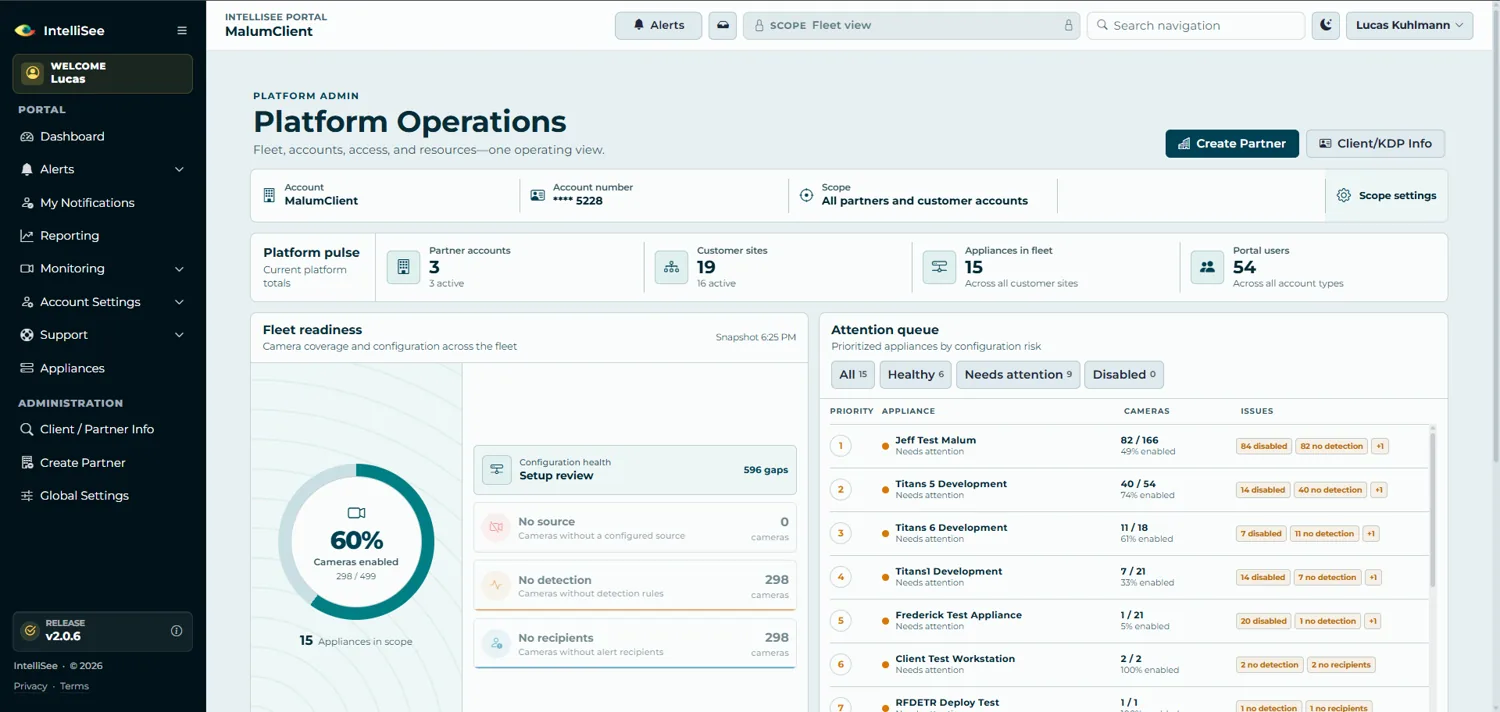
Customer and support teams can see appliances, cameras, account scope, coverage, setup gaps, and health signals in a single operational view.
The customer, partner, and support web application behind IntelliSee, an AI security system that adds threat detection to existing cameras.
IntelliSee adds real-time threat detection to existing security cameras. QC Devworks built the web application used to configure that monitoring, review detections, manage the appliance fleet, route alerts, report on readiness, support customers, and serve partner operations.
A connected application for customer, partner, and support teams, documented from the delivered product.
The portal is the human layer around the detection system. It shows what is protected, what needs attention, what happened, who was notified, and what to do next.
The production codebase includes the workflows below as connected parts of one product.
Customer and support teams can see appliances, cameras, account scope, coverage, setup gaps, and health signals in a single operational view.
The portal supports camera discovery, IP scanning, source configuration, masking, detection rules, locations, and alert-recipient setup.
A filterable alert log combines images, video, risk categories, cameras, locations, appliances, review state, saved views, and false-positive reporting.
Recipient preferences, email and text delivery, live notifications, external integrations, and RapidSOS workflows connect a detection to the right response.
Customers can track detection trends, review completion, camera coverage, setup gaps, top cameras, time patterns, user activity, and scheduled safety briefs.
Separate partner and platform-admin workspaces cover customer onboarding, estimates and orders, resources, support tickets, diagnostics, controlled support access, and release management.
Appliances, cameras, sources, masks, detection rules, locations, and recipients define each monitoring environment.
Authenticated appliance traffic carries alert evidence and device context into the central application.
Notification rules and integrations deliver the event to the people and response systems that need it.
Customers and support teams inspect activity, flag false positives, diagnose gaps, and track operational readiness.
The application runs on ASP.NET Core 9 with SQL Server and Entity Framework Core. It combines role-based Identity, Microsoft SSO and customer Active Directory options, real-time SignalR updates, authenticated alert ingestion, replay protection, delivery integrations, liveness and readiness checks, guarded schema changes, verified backups, automated tests, and revision-locked IIS deployments.
Custom software development for small and midsize businesses: web apps, internal tools, custom CRMs, customer portals, and SaaS replacement.
Workflow automation and API integration services that connect your CRM, accounting software, email, and spreadsheets so data is entered once.
Tell QC Devworks what you want to build, automate, or replace. Request a quote from our custom software development team in Moline, Illinois.
Tell us what you want to build, automate, or replace. We reply by email with questions or a next step.
Request a quote