

A machine shop in the Quad Cities can lose a $40,000 job without ever quoting it. The RFQ arrives as an email with three PDF prints attached, lands in one estimator’s inbox during a busy week, and sits unread while a competitor sends pricing within two days. Nobody decided to skip the job. The intake process decided for them.
This guide explains how to automate RFQ intake without replacing your ERP, your quoting spreadsheet, or anything else that already works. That last part matters, because most of the advice published on this topic is written by enterprise software vendors whose answer is a platform migration. For a shop with five to fifty people, that answer is usually wrong.
Where quote requests actually die in a small shop
Most small manufacturers lose quotes between the inbox and the estimator, not at the pricing stage. The estimating math is usually fine. What fails is everything before it: requests arrive through email, phone calls, and walk-ins; attachments get separated from conversations; nothing records who owns the request or when a response is due.
The failure points are predictable:
- No single front door. RFQs arrive by email, phone, referral, and occasionally a contact form that nobody monitors. Each channel has its own failure mode.
- No owner. When a request lands in a shared inbox, it belongs to everyone, which means it belongs to no one.
- No status. Asking “did we ever quote that bracket job?” requires searching three inboxes and a spreadsheet that was last updated the week before.
- Re-keying. The same part number, quantity, and due date get typed into an email reply, a spreadsheet log, and the quoting tool. Every re-key is a chance for an error that surfaces at delivery.
- No triage. Estimators spend hours on RFQs the shop was never going to win or should never take, while good-fit requests wait.
If this list sounds familiar, the problem is not effort or discipline. It is that the intake process was never designed. It accreted.
Why the standard advice does not fit shops under 50 people
Most published guidance on RFQ automation assumes you are an enterprise manufacturer with a CPQ platform, a sales engineering team, and a six-figure software budget. Vendor content from the CPQ world, such as Tacton’s guide to responding to RFQs faster with AI, is solid advice for companies selling complex configurable products at volume. As of January 2026, that guidance centers on AI reading unstructured RFQ documents and feeding configuration logic that already lives inside a CPQ system.
Notice the assumption: the configuration logic already lives inside a CPQ system. If your shop quotes from experience, a spreadsheet, and a senior estimator’s judgment, that advice skips the part you actually need. You do not need a configure-price-quote engine. You need the requests to arrive complete, get a fast bid or no-bid decision, and land in front of the right person with a due date.
That is an intake problem, and intake problems are solved with workflow design and a modest amount of software, not a platform replacement.
What it means to automate RFQ intake
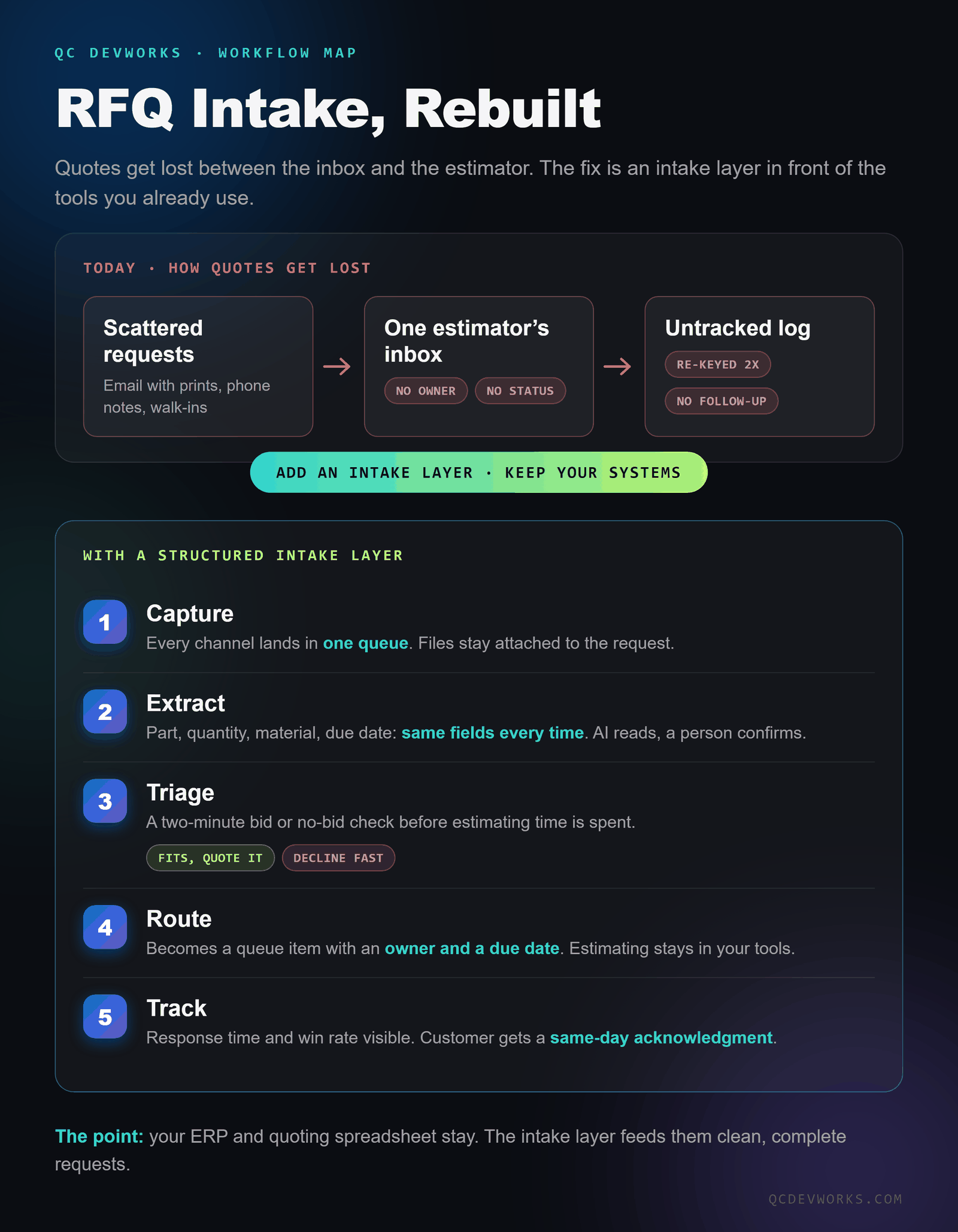
To automate RFQ intake means putting a structured layer between “a customer sent us something” and “an estimator is working on it,” so that capture, extraction, triage, routing, and tracking happen the same way every time. Five stages, each small on its own:
| Stage | What it does | What it replaces |
|---|---|---|
| 1. Capture | Every channel lands in one queue: a quote request form, a watched inbox, and a 60-second phone-note shortcut. Files stay attached to the request. | Three inboxes and a sticky note |
| 2. Extract | Part, quantity, material, finish, due date, and contact get pulled into the same fields every time. | Reading the email four times and re-keying it twice |
| 3. Triage | A two-minute bid or no-bid check against simple rules before estimating time is spent. | Quoting everything, including jobs you should decline |
| 4. Route | The request becomes a queue item with an owner and a response due date. | “I thought you had that one” |
| 5. Track | Status, response time, and win rate become visible. The customer gets a same-day acknowledgment automatically. | Silence until the quote is ready, if it ever is |
None of these stages require touching your ERP. The intake layer sits in front of your existing tools and feeds them clean, complete requests.
The same RFQ, two outcomes
The difference between manual intake and an intake layer shows up in the first hour, not the first month. Walk one request through both versions.
Manual process. A buyer emails prints for a machined housing, 250 pieces, needed in six weeks. The email lands in the owner’s inbox on a Tuesday. The owner forwards it to the estimator on Thursday with “can you look at this?” The estimator downloads two of the three attachments, misses the revision note in the email body, and logs the job in the spreadsheet on Friday. The buyer, who heard nothing for three days, has already sent the same package to two other shops. Your quote goes out in nine days. One of the other shops answered in two.
With an intake layer. The same email hits a watched address. Within minutes the request exists as a structured record: part name, quantity, due date, all three files attached, revision note flagged. The buyer gets an automatic acknowledgment with a realistic response window. The estimator sees it in the queue Wednesday morning with a due date. Triage takes two minutes: the work fits, quote it. The quote goes out in two days, and the log of what happened exists without anyone maintaining it.
Nothing about the pricing changed. The shop did not get smarter overnight. The requests stopped leaking.
How to keep your ERP and your quoting spreadsheet
The intake layer connects to existing systems instead of replacing them, which is what makes this practical for a small shop. The integration points are narrow and well-defined:
- Email stays email. A watched mailbox feeds the queue. Estimators still reply from their own accounts.
- The spreadsheet stays, if you want it. The intake system can write a row to the same log your team already trusts, except now the row is complete and arrives without re-keying.
- The ERP gets involved later. Intake happens before a job exists, so most shops only push data to the ERP after a quote is won. That is one integration, not ten.
- Your CRM or calendar can hook in. Follow-up reminders on outstanding quotes are a calendar event or task, created automatically when the quote goes out.
This is the same pattern we use across workflow systems generally: leave the systems people trust in place, fix the connective tissue between them. If you are weighing which connective tissue to fix first, our guide on which workflows are worth automating covers the selection logic.
Where AI helps, and where it should stay out of the way
AI is good at exactly one stage of RFQ intake: extraction. Reading a rambling email, a scanned print title block, or a forwarded thread and pulling out part, quantity, material, and due date is unstructured-data work, and current models handle it well enough to save real time, provided a person confirms the result before it drives a quote.
AI should not make the bid or no-bid call, set pricing, or send commitments to customers. Those decisions carry your margin and your reputation, and the cost of a confident wrong answer is too high. The pattern that works is the one we build into AI agents and automation projects generally: AI drafts, structures, and accelerates; a person approves anything that leaves the building.
A useful test: if an AI mistake at a given step would embarrass you in front of a customer, that step keeps a human in it.
A 30-day rollout for a small shop
A working intake layer can be live in about thirty days because the scope is narrow: one workflow, your existing tools, and a small piece of software in between.
- Week 1: map and measure. List every channel RFQs arrive through. Pull the last twenty requests and write down, for each one, when it arrived, when the customer first heard back, and when the quote went out. This baseline is what you will beat.
- Week 2: design the front door. Define the fields every RFQ needs. Stand up the quote request form and the watched mailbox. Write the triage rules as a short checklist your estimator already applies in their head: materials you run, tolerances you hold, quantities that make sense, customers you will not chase.
- Week 3: build the queue and connect it. Requests become records with owners and due dates. Acknowledgment emails go out automatically. The log writes itself. If extraction is included, AI fills the fields and a person confirms them.
- Week 4: run both systems in parallel, then cut over. Process a week of real RFQs through the new path while the old habits stay available. Fix what annoys people. Then make the queue the only path.
After thirty days, compare against the Week 1 baseline: time to first response, time to quote, and how many requests fell through. Those three numbers tell you whether the system is paying for itself.
Frequently asked questions
What does it cost to automate RFQ intake?
Costs vary with how many channels you capture and whether AI extraction is included, so treat any flat number you read online with suspicion. The honest comparison is against what manual intake already costs: estimator hours spent on re-keying and bad-fit quotes, plus the jobs that leak away unanswered. A shop quoting a few hundred RFQs a year usually finds the leak is worth more than the fix.
Do we need to replace our ERP to do this?
No. The intake layer operates before a job exists in your ERP, so it sits in front of your current systems rather than inside them. Most shops only connect the ERP at the point a quote is won, and some skip even that at first.
Can we just use a shared spreadsheet instead?
A shared spreadsheet beats nothing, and for very low volume it can be enough. It still depends on someone re-keying every request by hand, it cannot capture attachments, and it will not send acknowledgments or reminders. When the spreadsheet becomes the bottleneck, that is the signal to add the layer in front of it. We covered the broader version of that decision in our guide on when to replace spreadsheets with custom software.
How is this different from buying CPQ software?
CPQ platforms configure and price complex products using rules built into the platform, and they earn their cost for manufacturers selling configurable products at volume. RFQ intake is the step before any of that: getting requests captured, triaged, and routed. Small shops usually need the intake step fixed and do not need the configuration engine.
The decision in one paragraph
If quotes are slow or leaking, fix intake before you shop for platforms. Capture every channel in one queue, extract the same fields every time, triage in two minutes, route with an owner and a due date, and track the three numbers that matter. Keep the ERP, keep the spreadsheet, and add the layer that feeds them. This is the kind of focused build we do as software for manufacturers, and if you want a second set of eyes on where your quoting process leaks, a free operations audit is the fastest way to find out.